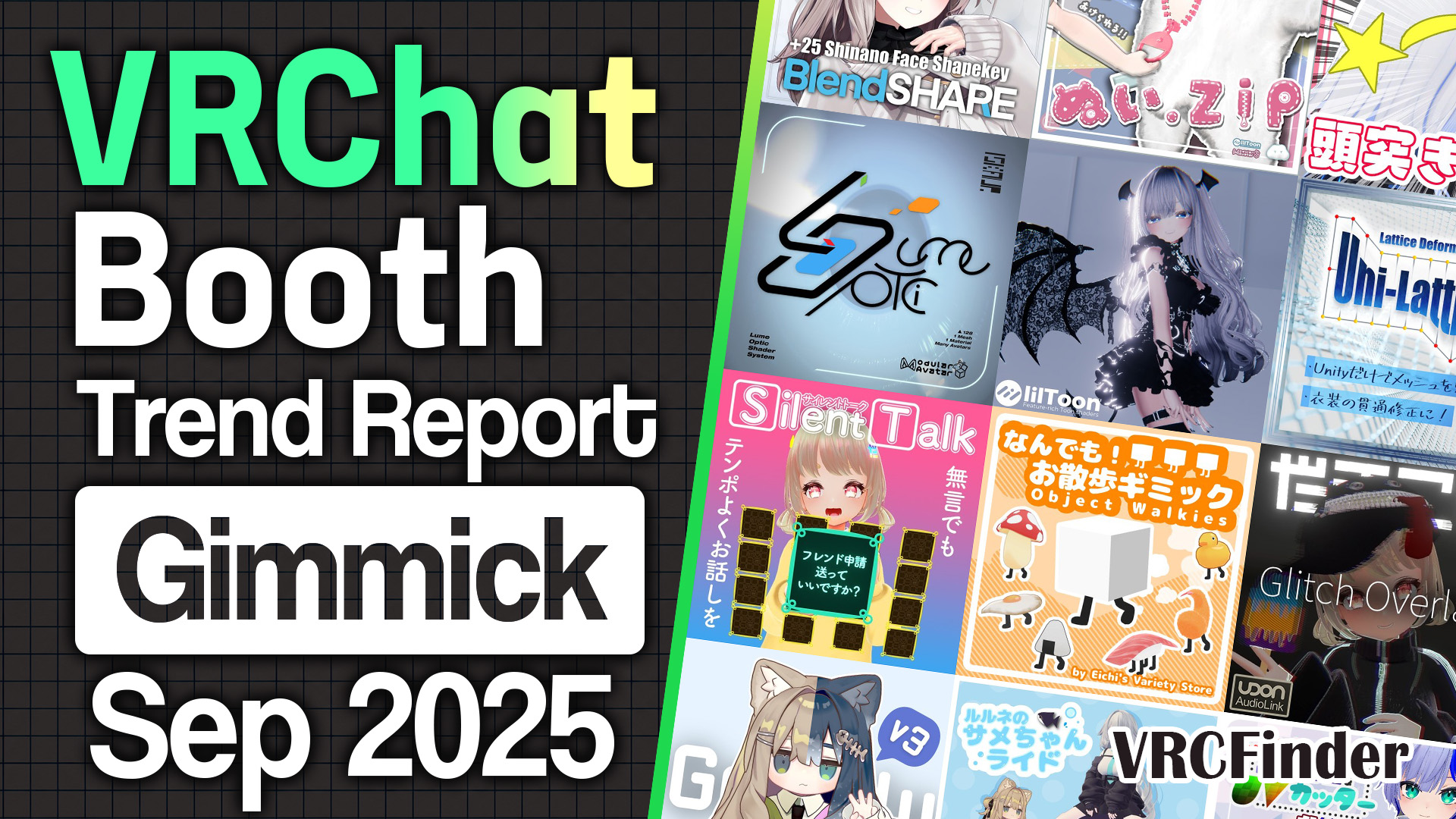
Here's my look back at the 10 most-liked gimmicks and tools published on Booth in September 2025, data included. What gathered at the top this month: tools for finishing the look of the avatar you already own, without leaving Unity.
At the top sits a shader that lays one more layer over your avatar's eyes like a contact lens, with pupils that widen and narrow as the surrounding light changes (8,055 likes). Let's start there and go through how each one works and where it fits.
📊 About the data Aggregated: 2026-11-13 / Target: gimmicks and tools published on Booth between 2025-09-01 and 2025-09-30 with 300+ likes (116 items)
- 10 Featured Gimmicks & Tools
- #1: Lume Optic Eye Shader System / Iskaur_online
- #2: Universal Real Shader lilToon Preset / Meta Space
- #3: Uni-Lattice / すぺいす
- #4: Silent Talk / だまこや
- #5: Object Walkies / Eichi's Variety Store
- #6: Glitch Overlay / だまこや
- #7: Gradelu / seseragi
- #8: Rurune's Shark Ride / AMINGU
- #9: Chun-chun Mesh Cutter / yueのbooth
- #10: Shinano Face Plus / Laevigata
- September 2025 Trends
- Summary
10 Featured Gimmicks & Tools
Ranked by like count as of the aggregation date (November 2026), one at a time, looking at how each works and where it fits.
#1: Lume Optic Eye Shader System / Iskaur_online
An eye shader you wear over your avatar's iris, like a contact lens. Changing how an avatar's eyes look usually means repainting the eye texture for that specific avatar. Lume Optic leaves the original eye untouched and changes the impression by laying a single layer on top. It gathered 8,055 likes to take first place among September 2025's gimmicks and tools.
The mesh it adds is a single flat circle, and the shader draws in the depth. Because that makes it easy to fit eyes of different shapes, it goes on almost any humanoid avatar, and the fitting values for each avatar are collected in a shared sheet that users fill in for one another. The pupil widens and narrows automatically with the surrounding light, so the eyes read differently in bright and dark spaces.
The iris pattern comes from dedicated textures, and plenty of compatible ones are already on Booth. The page states plainly that selling items made for Lume Optic doesn't require the corporate license, which makes it a base that people who design eyes can build on too. It installs through Modular Avatar, and the personal license is ¥2,200.
#2: Universal Real Shader lilToon Preset / Meta Space
A lilToon preset of photo-ready light and shadow that works on any avatar. lilToon has a lot of settings, and tuning shadow depth or the light catching an edge by hand easily turns into guessing which slider to touch. This preset comes in four parts — face, body, hair, and clothes — and you apply it by picking its name from the material's preset menu. It placed #2 with 6,779 likes, at ¥800.
What it sets includes shadows, backlight, gloss, and rim light. In the sample shots, backlight catches the outer edge of the hair and clothes in a white line, and even the texture of black fabric stands out. As the "for photography" pitch suggests, the same pose comes out with noticeably more depth.
Since face, body, hair, and clothes are applied separately, you can leave the skin as it is and sharpen only the hair and outfit. The sample avatars are Shinano and Manuka, and it's meant to be used with the latest lilToon.
#3: Uni-Lattice / すぺいす
A tool for reshaping outfit and avatar meshes by bending them with a lattice, right inside Unity. Put an outfit on an avatar it wasn't made for and the shapes don't line up: skin pokes through the clothes, or the clothes float off the body. The usual fix is a trip to Blender. Uni-Lattice brings lattice deformation — move the points of a cage around the mesh and the mesh inside bends smoothly to follow — into the Unity editor. It placed #3 with 4,969 likes, at ¥800.
It works on any object with a Skinned Mesh Renderer or a Mesh Filter, and it duplicates the object and its mesh each time you edit, so you can fix the shape while keeping the shape keys intact. From cleaning up breakage on an unsupported outfit to adjusting the shape of an outfit or avatar itself, you tune it while watching the result.
A numpad helper tool called BU_Numpad is bundled, and pairing the two cuts down the steps for picking lattice points. Updates have kept coming since release, and the February 2026 version added the ability to save a deformation as a new shape key. It doesn't touch bones or weights; it sticks to deforming shape.
Sponsored
#4: Silent Talk / だまこや
A gimmick for people who play without speaking, letting them get a message across with a set of 16 word panels. VRChat has plenty of players who skip the mic and communicate through gestures and text — the so-called mute players. With Silent Talk, making a finger-gun hand sign with both hands lays the panels out in front of you, and touching a word with your finger shows it in large type on the other person's side. It placed #4 with 4,634 likes.
Everything runs on hand signs and fingertip touches, so there's no pause to dig through a menu and the conversation keeps its rhythm. The 16 phrases can be swapped from a large set of prepared words, and with the included PSD for making word images, your own images can become panels too. The panel frames come in three designs, a lighter version without frames is included, and it works on Quest standalone as well.
It was originally built for "Nadenade Matching," so the default phrases lean toward lines like "Please give me headpats!" and "Can I get a hug?" — alongside plenty of general-purpose ones. The base version is free, and a ¥500 version adds an avatar pen that you wear as a pencil hair clip and pull into your hand with a hand sign.
#5: Object Walkies / Eichi's Variety Store
A gimmick that sprouts legs on any object you like and has it trot along behind you. Most follower pets come in a fixed animal shape. This one provides only the legs and the walking animation, so whatever you set on top starts walking. It placed #5 with 4,539 likes, at ¥500.
Fall too far behind and it kicks up dust and dashes to catch up; you can also carry it, set it on the ground, or fix it to the world. In VR, other people can grab it directly too, so handing your walking mushroom to a friend just works.
To get you started, six objects come bundled: a mushroom, a fried egg, a fried shrimp, a rice ball, sushi, and a duck. There are two-legged and four-legged versions plus a shape key that thins the legs, so you can match whatever you swap in by size and shape.
#6: Glitch Overlay / だまこや
A shader that layers glitch effects over a material while leaving the original material alone. Adding noise and distortion that look like a corrupted video signal usually means swapping the material itself for a dedicated shader. Here you add one more material slot to the renderer and put it there, so the effect stacks on top without breaking your current look. It placed #6 with 4,244 likes.
The settings cover 16 sections, including blocky rectangular offsets, VHS and CRT-style smearing, mosaic, barcodes, glowing edges, and scrolling text-like patterns, and you can pick and combine only the ones you need. It supports AudioLink too: choose one of four frequency bands from bass to treble and the glitch fires in time with it, so in a world playing music your props and outfit can break up to the beat. A January 2026 update added "Material Error," which turns things the solid pink you see when a shader fails to load.
だまこや is the same shop behind #4's Silent Talk, and in September it also released a dome that opens a whole landscape inside (I cover it in the trends below). It comes as a ¥1,000 standard version and a ¥5,000 commercial version that lets you build it into assets you sell.
Sponsored
#7: Gradelu / seseragi
An editing aid that adds color gradients and patterns to textures while you watch the avatar inside Unity. Changing the color of hair or clothes usually means a loop of exporting the texture to a paint program, painting, bringing it back into Unity, and checking. Gradelu keeps that whole loop inside Unity and writes out exactly what you see in the preview, as either edited textures or an edited avatar. It placed #7 with 3,669 likes, at ¥1,500.
It handles color adjustment with gradients, solid colors, and masks, emission tuning, stamps for one-off patterns, and overall effects like backlight, rim light, and outlines. It never repaints the original avatar directly; it edits a working copy, so if you don't like an experiment you can always go back.
After going live on September 23, it got three updates in the next four days, then kept growing through major versions 2.0 and 3.0. It's currently lilToon-only, with the interface available in Japanese, English, Chinese, and Korean.
#8: Rurune's Shark Ride / AMINGU
A gimmick that lets you climb onto Rurune's pet shark and ride it. Rurune is a popular shark-themed avatar that comes with a shark perched on its head; the one you ride here is a separate, much bigger shark. AMINGU contacted the avatar's creator in advance and got permission before selling it. It placed #8 with 3,420 likes.
From the menu you can ride, call it to your hand, breathe fire, resize it, or fix it to the world. Make a finger gun with your right hand and the shark breathes fire, and its face switches among five expressions to match your hand signs. Size scales from 0% to 100%, so you can shrink it down to sit on your palm and carry it around, and with three-point tracking in VR you can move your hands while riding.
You need the Rurune avatar itself, but the rider can be almost any humanoid, with tuned data for Kipfel, Nemesis, ELusion, Chiffon, Chocolat, and Manuka. Pricing runs ¥400 for Rurune alone, ¥500 for Rurune plus another avatar, and ¥1,500 for the full set covering all seven.
#9: Chun-chun Mesh Cutter / yueのbooth
A free tool for non-destructively deleting or cutting out parts of a mesh by clicking them directly in the Scene view. When you want to remove part of an outfit, or lift a part off to use on another avatar, the usual route is editing the mesh in Blender and bringing it back into Unity. This tool lets you select the faces you want gone by clicking or dragging in the Scene view, and the deletion is applied only at upload time. It placed #9 with 3,092 likes.
There are two deletion modes, and choosing the one that works with Modular Avatar lets you show and hide the removed part from a menu. You can also copy a selected mesh along with the bones it needs and cut it out as a standalone item, and edit UVs — for example, stretching a cut-out part's UVs back to fill the whole texture.
The source is public on GitHub under the MIT license, and the product page even lays out when to use what: the existing features in Modular Avatar or Avatar Optimizer for removing large areas at once, and this tool for picking small areas precisely. A separate VPM version is available for anyone who wants to leave a tip.
#10: Shinano Face Plus / Laevigata
A free asset that adds 25 shape keys to the face of the avatar Shinano. It lets you fine-tune small parts of the face with sliders — eyelash size and length, eyelids, the area around the nose, the jawline. It placed #10 with 2,641 likes.
Laevigata also made Milltina Face Plus, which adds expression shape keys to Milltina's face and placed #8 in my August 2025 report. Month after month, they've kept releasing free data that widens how far you can adjust a popular avatar's face.
It installs through BlendShare, applying only the difference data rather than shipping the original FBX. A post-release update added three more shape keys for the outer corners of the eyes. The base is free, with a ¥300 support version available.
Sponsored
September 2025 Trends
Beyond the ranking, here's what the full set of 116 gimmicks and tools published on Booth in September 2025 shows.
| Metric | Value |
|---|---|
| Items in scope | 116 |
| Average likes | 1,176 |
| Median likes | 777 |
| Average price | ¥532 |
| Median price | ¥400 |
| Share that are free | 28% (32 / 116) |
| Share under ¥1,000 | 84% (98 / 116) |
| Free within the Top 10 | 3 (#4, #9, #10) |
Average likes come to 1,176 against a median of 777. First place at 8,055 and second at 6,779 sit about 1,300 apart, making this a month where the top ranks stepped down evenly rather than one item breaking away. The median like count also tops July's 718 and August's 655. On price, the median slipped from August's ¥500 to ¥400, and 84% of items came in under ¥1,000.
Features: particles and hand-driven effects run deep
Top 10 Features
Distribution of product features, capabilities, and gimmick types.
Feature counts run lilToon 39 / particles 30 / facial animation 21 / ON/OFF toggle 20 / hand-sign linked 17 / Modular Avatar 16 / shape keys 16 / world-fix 16 / blend shapes 13 / shader 12. What stands out is particles at 30 and hand-sign linked at 17 — by count, gimmicks that set off light and effects through hand shapes and menus are well represented. The keyword counts tell a similar story: after free at 36 and gimmick at 33 come sound effects at 17 and effects at 16, with editor extensions at 14.
The Top 10 leaned toward tools that finish an avatar's look, but across the category, gimmicks made for play form a solid base.
Starting with one that combines hand signs and particles.
夢の落とし物's "Lightning Spear & Stake Gimmick" lets you summon a spear of lightning and throw it. Clench your right hand and the spear appears; open it to throw, and it bursts with a lightning strike on impact. Slam it into the ground at your feet with both hands clenched and it drives in like a stake, calling down more lightning around you. It was inspired by a game the creator had been playing, and the lightning comes in four colors you pick from the menu, at ¥800.
From the same shop as #6, だまこや, comes a piece that swaps the whole scenery with an ON/OFF toggle.
だまこや's "Private Dome" spreads a sky or outer-space landscape inside a dome about two meters across. From outside, the dome itself can't be seen, but step inside and you're surrounded by wide scenery, so you can carve out a photo spot of your own in a corner of any world. The menu switches among five landscapes and can bring up a mirror. The dome is fixed to the world, so the scenery doesn't shift as you move around inside. ¥600.
From the lilToon bracket, here's one that opens up a plushie's belly.
つゆのひ's "Nui.Zip" puts a zipper on the belly of a plush-style avatar that you can open and close by hand. You can put any image you like inside, and a transparent mode lets you show off an object hidden in there. It supports Nekochiyan plus the later-added Donaga Pug and Donaga Kuma, at ¥500 per avatar or ¥800 for a full pack covering all three.
Supported models: Shinano and Ichigo lead, the rest close behind
Top 10 Supported Models
Distribution of supported avatar models.
Supported-model counts run Shinano 11 / Ichigo 10 / Kipfel 9 / Manuka 9 / Mamehinata 8 / Chocolat 8 / Milltina 8 / Rurune 7 / ELusion 6 / Chiffon 6. Shinano at 11 and Ichigo at 10 lead, with the rest packed within one to three of each other — no single avatar dominates. The Top 10 includes items built on popular avatars too: Shinano's face shape keys at #10 and Rurune's shark at #8.
First, a free one that comes preconfigured for many avatars, Shinano included.
ゆるどの雑貨屋's "General-Purpose Walking Particle Gimmick" gives off particles as you walk. Six particle styles come set up out of the box, and the prefabs for Shinano, Manuka, Milltina, Kipfel, and other avatars work as soon as you drop them under the avatar. It runs on both desktop and VR, and even unsupported avatars can use it once you align the position by following the manual. Free.
In the Ichigo bracket, there's data that remakes both build and expressions.
夕時茶屋's "Ochibi-chans ICHIGO ⁺Sister"S"" is variant data that remakes the avatar Ichigo with a chibi build and chibi expressions. It's the 11th entry in the shop's Ochibi-chans series and includes two versions with different concepts: an older sister who keeps Ichigo's original character, and a younger sister made with the series' familiar approach to expressions. Each has 64 expressions, and compatible outfits can be put on with the bundled dress-up tool. ¥1,000 each, or ¥1,600 for the full set with both.
A ride covering the Mamefriends avatars, Kipfel included, all the way to Shinano and Manuka also appeared.
たかをわーくす (TaKaO-Works)'s "Floating Board Gimmick" puts you on a hovering board you can ride around. While riding, look up to rise and look down to descend, so you control height with nothing but the direction of your head. In VR, a custom control panel you open with a hand motion lets you quickly pick riding, dismounting, or full-body tracking modes, and five fixed poses using the board are included for photos. Supported avatars are split into three packs — Mamefriends, Chibi, and Regular — at ¥500 each, or ¥1,200 for the full pack.
For Manuka, a free fix for one specific photo headache.
黒化堂 nigredou's fix for keeping the whites of the eyes from going dark in worlds with ambient occlusion (the Manuka version) does exactly what its long name says. In worlds that use ambient occlusion — a technique that darkens the gaps between objects — the eye sockets catch that shadow too, and the whites of the eyes can look gray. This one combines a mesh shaped to Manuka's eyes with a material that counters the effect, and all you do is drop the prefab under the avatar. It was made after the creator's eyes went dark in a photo-spot world, and it's released free under CC0.
Price: a ¥400 median, only 2 at ¥3,000+
Price Distribution
Price bucket distribution for products in this theme during the period.
The price distribution runs free 32 / ¥1–499 at 28 / ¥500–999 at 38 / ¥1,000–1,999 at 14 / ¥2,000–2,999 at 2 / ¥3,000–4,999 at 2 / ¥5,000+ at 0. The largest band is ¥500–999 with 38 items, followed by free at 32 and ¥1–499 at 28, and 98 items — 84% — sit under ¥1,000. Four items are priced at ¥2,000 or more, and in the Top 10 that band includes #1, Lume Optic (¥2,200).
From the free side, one aimed at people who keep adding tools to their kit.
豆々庵's "VCC Template Builder" turns your current Unity project into a template for creating new projects in VCC. No more reinstalling lilToon and Modular Avatar one by one for every new project — you start with everything in place, down to the editor extensions you've added yourself. It supports ALCOM too, and it's free. 豆々庵 is the shop behind ItemToggleBuilder, which builds outfit toggle menus automatically and appeared in my August 2025 report.
Here's a free one with a playful streak in how it's offered.
赤糸の裁縫箱's "Headbutt!" does what it says: it lets you headbutt someone. Bump heads and particles and sound effects go off; clench both fists and tilt your head back to charge up, and the effect changes with how much you charge. Turn on the counter option and, if someone headbutts you while you're charging, you're the one who goes down. The base is free, and the support versions are labeled "Give the creator a headbutt."
And from the thickest band, ¥500–999, a tool that helps with optimization.
Noshi_Shop's "TexOptimizer" automatically finds the textures an avatar or outfit uses and lightens their import settings in one pass. Pick from ten presets and the settings shift toward a smaller download, faster loading, and less texture memory, with an automatic backup made before processing. It recognizes lilToon texture types and lets you exclude specific textures. ¥500, with a ¥600 support version that has identical contents.
Sponsored
September 2025 through a gimmick creator's eyes
Pulling four threads from the Top 10 and September's overall numbers. Three months are stacked so the movement against the July and August reports is visible.
| Metric | July 2025 | August 2025 | September 2025 |
|---|---|---|---|
| Items in scope | 121 | 132 | 116 |
| Median price | ¥300 | ¥500 | ¥400 |
| Median likes | 718 | 655 | 777 |
| Share that are free | 33% | 22% | 28% |
| Share under ¥1,000 | 82% | 83% | 84% |
| Items at ¥3,000+ | 7 | 5 | 2 |
| Free within the Top 10 | 2 | 5 | 3 |
| Top 10 with a PV | 8 | 6 | 8 |
Points worth watching as a gimmick creator:
-
The top two change how an avatar is rendered — #1 is an eye shader laid over the iris and #2 is a lilToon light-and-shadow preset; add the glitch at #6 and three of the Top 10 are shader-side tools that change how things are drawn rather than their shape. August's top was led by working tools for posing, photography, and painting colors, but in September tools for how the same avatar catches light and how it reads took the lead. Each of them leaves the original eye or material in place and adds a layer on top.
-
Fixing shape and color without leaving Unity — #3 Uni-Lattice handles outfit shape, #7 Gradelu handles color, and #9 Chun-chun Mesh Cutter handles mesh cutting and UVs, each inside the Unity editor. All of these are jobs you'd normally take out to Blender or a paint program, and they remove the export-and-reimport step on every round trip. Three of them together in the Top 10 show avatar editing gathering into Unity as a single workspace.
-
Released as a base the next maker can build on — #1 Lume Optic swaps iris patterns through dedicated textures and says no corporate license is needed to make and sell compatible ones. #6 Glitch Overlay offers a commercial version you can build into assets you sell, and #9 publishes its source under MIT. Across three of the top picks, you can see releases aimed not only at the people using them but at the people who'll make something on top of them.
-
The price center moved down, the top band thinned — The median fell to ¥400 from August's ¥500, and the share under ¥1,000 reached 84%, the highest of the three months. Items at ¥3,000 and up dropped from 7 in July and 5 in August to 2. The Top 10 also stays between free and ¥2,200, and pricing like #4's free base with a pen bundle on top, or #8's ¥400–¥500 per-avatar split, shows a pattern of a low way in, letting people pick only what they need.
Summary
September 2025's gimmicks and tools were a month where tools for finishing the avatar you already own, all the way inside Unity, filled the top. A shader that changes how the eyes read by laying one layer over the iris, a preset that adds photo-ready light and shadow, a tool that bends an outfit's shape with a lattice, a tool that paints in color gradients on the spot. None of them is about buying another avatar; each is about nudging the one you already have, step by step, toward the look you picture.
Alongside them sat pieces pointed at time spent with other people: panels that pass a message without a voice, legs that take anything for a walk, a shark you can ride. Tools for refining shape and color on the workbench and gimmicks for closing the distance with whoever's next to you in a world get used in different places, but both are ways of making the time you spend as your avatar a little more your own. What defined September's Top 10 was that both sides were filled with creators who put care into the smallest details.
Sponsored
Other categories for September 2025
The new Booth releases of September 2025 are covered category by category in my monthly reports.
- [September 2025] VRChat Avatar Trends & Ranking | Booth Trend Analysis
- [September 2025] VRChat Outfit Trends & Ranking | Booth Trend Analysis
- [September 2025] VRChat Hairstyle Trends & Ranking | Booth Trend Analysis
- [September 2025] VRChat Accessory Trends & Ranking | Booth Trend Analysis
- [September 2025] VRChat Small Item Trends & Ranking | Booth Trend Analysis
About the data
- Aggregation date: 2026-11-13
- Scope: gimmicks and tools published on Booth between 2025-09-01 and 2025-09-30 (116 items)
- Ranking basis:
like_countin descending order as of the aggregation date - Inclusion criteria: the VRCFinder database only collects products with 300 or more likes, so items below that threshold at aggregation time are not included
- Note: figures and rankings in this article are a snapshot as of the aggregation date and may differ from current values. "Published" refers to when the Booth product page went live, which can differ from when sales actually began
- Supported models, specs, and prices are based on Booth product pages as of writing. Sale prices and updates may change, so please check the Booth page before purchasing